An AI game prototype camera test compares a few framing rules in the same tiny playable scene before you add more rooms. Test centered follow, look-ahead, dead zone, and bounds first, then build map content only after the camera makes the player understand what matters.
Camera problems look like level problems when you catch them late. A player misses a turn because the hazard enters too late. They hug a wall because the view keeps snapping. They overshoot an enemy because the camera follows the avatar instead of the decision.
That is why the camera deserves a lab test. You do not need the real map yet. You need one room, one turn, one threat, one pickup, and a route that makes the camera answer a practical question: can the player read the next decision before they are already inside it?
This is a practical workflow article for AI-assisted 2D prototypes. The citations point to official camera documentation for Godot, Unity Cinemachine, GDevelop, and Chatforce because the article is about test setup and tool fit, not a vendor release.
Chatforce
An AI game studio for getting a 2D browser-playable camera test from a prompt quickly, before you commit to a full engine project.
Godot
A strong fit when you want direct access to Camera2D limits, drag margins, and position smoothing.
Unity Cinemachine
A good production option when you need dead zones, soft zones, damping, follow targets, and 2D confinement.
GDevelop
A readable no-code path for simple camera-follow tests and object-centered camera actions.
The Camera Is Part of the Mechanic
The camera decides when information enters the game. In a platformer, that might be the next ledge. In a top-down delivery game, it might be a crossing car. In a dodge arena, it might be the edge of a projectile pattern. If the camera reveals the wrong thing late, the player reads the game as unfair even when the collision and controls are correct.
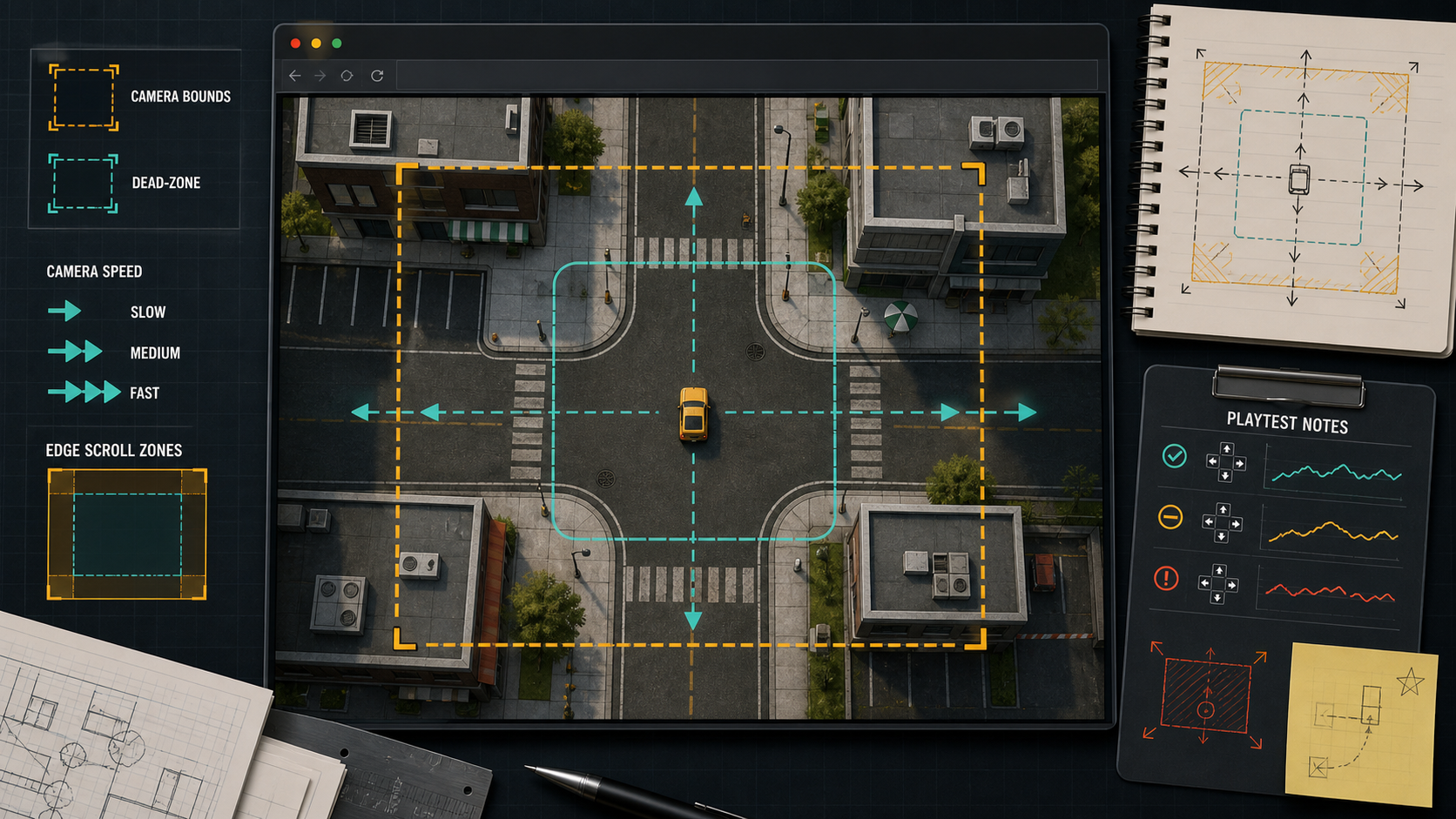
AI builders are especially exposed here because a generated prototype often defaults to centered follow. Centered follow is fine for a toy room. It can be poor for a real decision space because half the screen shows where the player has already been.
If the camera cannot explain one room, it will not explain ten rooms.
Four Camera Variants Worth Testing
| Variant | What it tests | Bad sign |
|---|---|---|
| Centered follow | Whether the core loop works with neutral framing | Players react late because forward information is missing |
| Movement look-ahead | Whether the view should bias toward direction and speed | Fast turns feel jumpy or the player loses track of their avatar |
| Dead-zone follow | Whether small movements should leave the camera still | The camera feels detached, then suddenly lurches |
| Room bounds | Whether edges and corners remain readable | The camera exposes empty space or hides incoming threats near walls |
Build a 60-Second Camera Track
Keep the test route short. For a top-down game, use a straight lane, a turn, one obstacle crossing from off-screen, one pickup near a wall, and one endpoint. For a platformer, use a jump, a vertical shift, a drop, and a hazard just beyond the landing. You are not testing level quality. You are testing whether the camera gives fair warning.
This is where Chatforce makes sense. If your question is "can this idea become browser-playable today with a readable camera?", a prompt-to-game workflow gets you to a shareable first version faster than opening a full Unity or Godot project. Move into an engine once the camera rule wins a real test and you need exact tuning, native exports, or custom tooling.
Weak Prompt vs Camera Test Prompt
| Goal | Weak prompt | Better prompt |
|---|---|---|
| Test follow | Make the camera better | Keep the same room and create a centered-follow camera variant with no smoothing and visible room bounds |
| Test anticipation | Add look-ahead | Create a second variant where the camera looks 25 percent ahead of the player movement direction, with the same speed and route |
| Test stability | Make the camera smoother | Create a dead-zone variant where small player movement does not move the camera until the avatar leaves the center box |
| Test edges | Fix the map corners | Add camera bounds so the viewport never shows outside the room, then place one pickup near each edge to test readability |
How to Judge the Result
Do not ask testers which camera feels professional. Ask where they looked before each mistake. If they say the hazard appeared too late, the camera may need look-ahead. If they say the screen kept moving while they aimed, try a dead zone. If they lose the avatar during turns, lower the camera speed or reduce the bias.
Watch the first run closely. Camera failures are often visible before the player has vocabulary for them. They pause at edges, tap movement instead of committing, or steer away from empty screen because they do not trust what is coming.
Use centered follow
The game is slow, compact, and the player needs equal information in every direction.
Small arenas, puzzle rooms, and simple collection prototypes.Use look-ahead
The player moves fast and needs to read what is coming in the direction of travel.
Runners, racing tests, delivery routes, and side-scrolling platformers.Use a dead zone
Tiny corrections make the camera feel restless or make aiming harder.
Top-down shooters, platformers with careful jumps, and games with frequent direction changes.Use strict bounds
The player reaches room edges or corners and the camera starts showing useless empty space.
Room-based adventures, city blocks, arena games, and tile maps.Engine vs AI Builder Tradeoff
Godot is the clean choice when you want to tune Camera2D properties directly and keep the 2D project light. Unity with Cinemachine is better when the camera will become a production system with zones, blends, confinement, target groups, and a larger toolchain. GDevelop is practical when the camera rule is simple and the team needs visible event logic.
Chatforce wins the earliest question: can you get a playable camera test into someone else's browser quickly enough to learn from it? That matters because most camera arguments are abstract until someone plays the route. Once the answer is yes, the engine decision becomes easier.
- Use one fixed test route across every camera variant.
- Keep player speed, obstacle timing, pickups, and room shape unchanged.
- Test centered follow before adding look-ahead or smoothing.
- Add one edge case near each room boundary.
- Ask testers what they saw before each mistake.
- Choose the camera rule that makes decisions readable, not the one that looks smoothest in isolation.
A bigger map will not fix a camera that reveals the wrong information late. Test framing while the prototype is still small enough to understand.
FAQ
What is an AI game prototype camera test?
It is a small playable scene where you ask AI to generate a few camera framing variants, then compare how each one affects readability, anticipation, and player mistakes.
Should I test camera smoothing first?
No. Start with centered follow, look-ahead, dead zone, and bounds. Smoothing is tuning after you know which framing rule helps the player read the game.
When should I move a camera test into Unity or Godot?
Move it into Unity or Godot when the camera rule has passed a playable test and you need exact control over physics, bounds, target groups, native builds, or production debugging.
Sources
- docs.godotengine.org/en/stable/classes/class_camera2d.html
- docs.unity3d.com/Packages/com.unity.cinemachine@3.0/manual/CinemachineConfiner2D.html
- docs.unity3d.com/Packages/com.unity.cinemachine@2.3/manual/CinemachineOverview.html
- wiki.gdevelop.io/gdevelop5/tutorials/follow-player-with-camera
- chatforce.com/game-studio