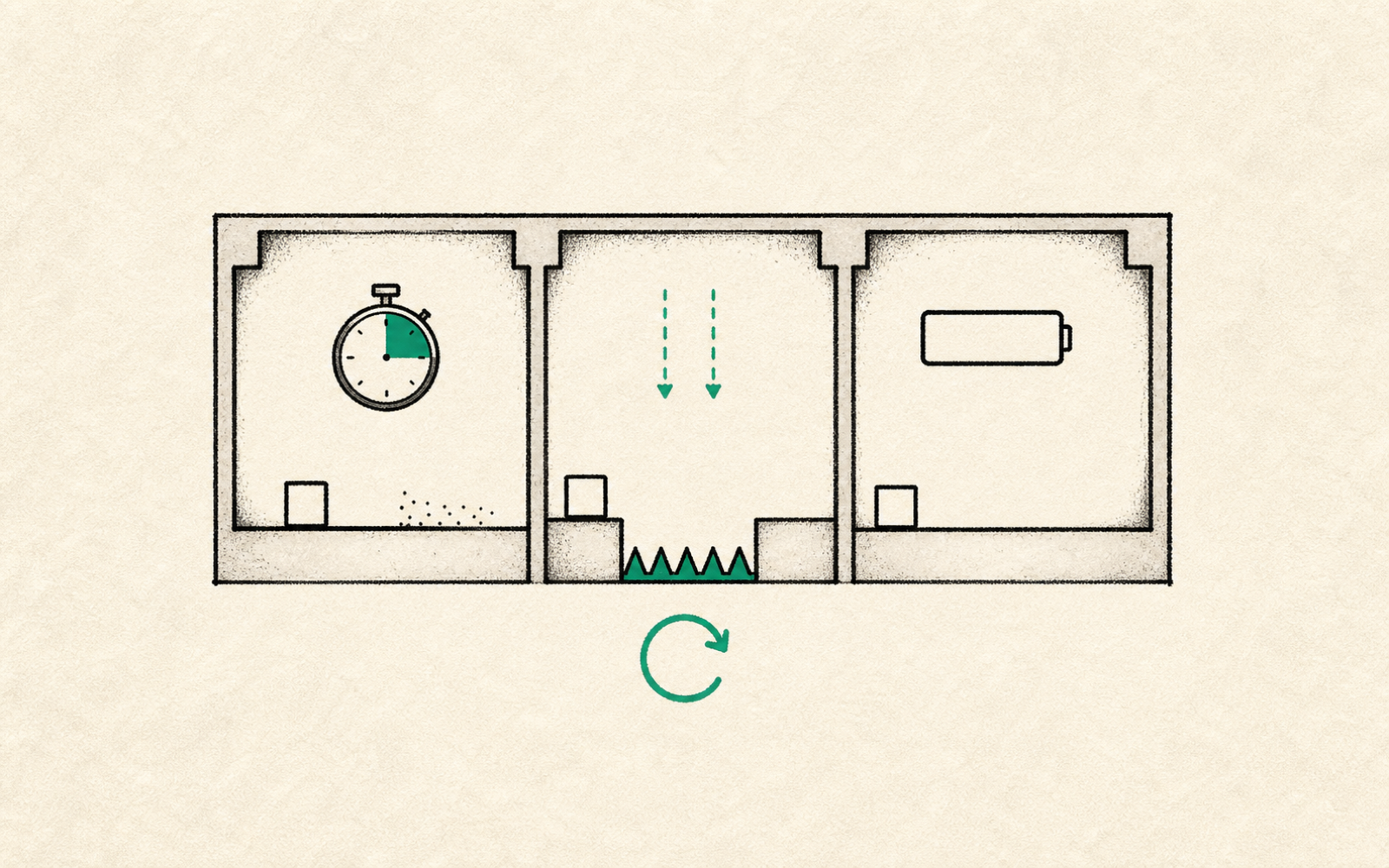
For an AI game prototype, failure states are how you find out whether the loop has pressure. Before you ask for more features, generate three ways the player can lose, then keep the one that makes the second attempt clearer.
Most early prototypes have a control scheme and a reward before they have a real reason to care. The player can move, collect, shoot, or jump, but nothing pushes back. That is why the build feels like a toy even when the prompt technically worked.
This is a practical workflow article for builders using AI-assisted game tools and traditional engines. It focuses on first playable pressure tests, not vendor news or release notes.
Godot
A good fit when the failure state needs direct control over input, collision, timers, and scene logic.
Unity
A production engine where input actions, physics, and state machines can support deeper failure tests.
GDevelop
A visual event-based tool that can make simple timer, collision, and resource-loss tests readable.
Construct
A browser-focused builder that works well for quick 2D fail-state experiments and event logic.
Start With Pressure, Not Content
A feature asks, "What else can the player do?" A failure state asks, "What mistake changes the next attempt?" That second question is more useful during the first playable because it tells you whether the game creates learning.
Ask the AI for variants, not expansion. The prompt should keep the same room, same controls, same goal, and same placeholder art. Only the loss condition changes. That makes the result easy to compare.
The first good failure state is usually worth more than the next five features.
Three Failure States to Test
| Failure type | What it tests | Bad sign |
|---|---|---|
| Timer failure | Whether the player moves with urgency and takes cleaner routes | The timer feels arbitrary or makes players rush past the interesting choice |
| Spatial failure | Whether pits, hazards, walls, or enemy positions teach better movement | The player blames unclear collision instead of their decision |
| Resource failure | Whether ammo, fuel, stamina, or health creates planning | The meter drains without changing what the player does |
| Contact failure | Whether enemies or obstacles create readable threat zones | The hit feels cheap because the player cannot predict it |
Use One Room So the Test Stays Honest
AI tools are fast enough to generate a whole level set before you know what the player is learning. Resist that. One room is cleaner. If the failure state cannot make one room tense, ten rooms will mostly create more places for the same weak rule to hide.
For a platformer, test a pit before a biome. For a top-down shooter, test ammo pressure before a new weapon. For a puzzle game, test an undo limit before adding puzzle count. The pattern is the same: make failure readable first.
Use a timer
The prototype feels correct but too slow.
Route choice, speed pressure, score chasing, and short arcade loops.Use spatial failure
The prototype is about movement, positioning, or reading the room.
Platformers, dodge games, stealth tests, and enemy placement.Use resource failure
The prototype needs planning instead of reflex.
Survival loops, tactical shooters, stamina systems, and risk-reward pickups.The Prompt Pattern
Write the prompt like a lab instruction. Keep the build small, name the one failure state, and state what you want to observe. You are not asking the tool to make the game better in general. You are asking it to make one kind of mistake possible.
Weak Prompt vs Failure-State Prompt
| Goal | Weak prompt | Better prompt |
|---|---|---|
| Add pressure | Make it harder | Keep the room the same, add a 45-second loss condition, and make the optimal route visible |
| Teach movement | Add obstacles | Add one pit that punishes late jumps without changing player speed or jump height |
| Create planning | Add stamina | Add a stamina meter that recovers only when standing still, then keep the goal reachable in one room |
| Compare versions | Make three variants | Create timer, pit, and resource versions with identical controls and goal placement |
- The player can explain why they failed.
- The second attempt changes behavior.
- The failure is visible before it happens.
- The prototype still works in one room.
- The loss condition tests the main verb, not a side system.
- The next prompt changes only the failure state or its tuning.
Do not ask AI for more game until the prototype has one fair way to lose. A fair loss is often the first sign that the loop can teach.
FAQ
What is a failure state in an AI game prototype?
It is the condition that makes the player lose, restart, or fail the current attempt. Good early examples include timers, hazards, resource depletion, and enemy contact.
Why test failure states before adding features?
Features can make a prototype look bigger without making it better. A failure state shows whether the player has something to learn on the next attempt.
How many failure states should I generate first?
Three is enough for a useful comparison: one time-based, one spatial, and one resource-based. Keep the room and controls the same so the comparison is fair.