An AI game prototype spawn budget test checks how much pressure one enemy type can carry before you add more enemies. Keep the arena fixed, test spawn interval, active enemy cap, spawn distance, and wave length, then add enemy variety only after the pacing rule stops doing useful work.
AI makes it too easy to ask for three more enemies when the first one is still unmeasured. The prototype gets busier. The notes get fuzzier. Nobody knows whether the problem is enemy behavior, spawn timing, player speed, damage, arena shape, or too many bodies on screen.
That is a bad trade. A first playable should answer one pacing question cleanly: can a single readable threat create pressure for 60 seconds without becoming noise? If the answer is no, a second enemy type usually hides the weak loop instead of fixing it.
This is a practical workflow article for AI-assisted 2D prototypes. The sources point to official timing, spawning, and object reuse documentation because the article is about test structure, not a release announcement or vendor comparison.
Godot
A clean fit for timer-driven spawn tests, signal-based wave events, and small 2D scenes that can be duplicated for variants.
Unity
Useful when the spawn test needs object pooling, profiling, later production tuning, or a path toward larger enemy systems.
Phaser
A good browser-first option when wave timing, scene clocks, and quick playable sharing matter more than a full editor workflow.
GDevelop
Useful when you want visible timer and spawner logic that non-programmers can inspect during early pacing tests.
Enemy Variety Is Not Pacing
A fast enemy, a slow enemy, a shooter, and a charger can make a prototype look more complete. They can also make the first playtest useless. When the player dies, you will not know whether the enemy pattern worked or whether the screen simply crossed the line into unreadable.
Start with one enemy that has one job. Maybe it walks toward the player. Maybe it patrols a lane. Maybe it fires a simple projectile. Then use the spawn system to test pressure. You are not trying to build the final encounter yet. You are trying to find the smallest amount of pressure that makes the player move with intent.
If one enemy cannot make a useful 60-second test, four enemy types will mostly create a prettier diagnosis problem.
Four Spawn Budget Variables Worth Testing
| Variable | What it tests | Bad sign |
|---|---|---|
| Spawn interval | How quickly pressure returns after the player clears space | The game alternates between empty downtime and sudden crowding |
| Active enemy cap | How many threats the arena can support before readability breaks | Players stop making plans and just run from the blob |
| Spawn distance | Whether new threats enter with fair warning | Enemies appear close enough that hits feel cheap |
| Wave length | How long the loop stays tense before fatigue or repetition sets in | Players solve the pattern in 15 seconds or quit from exhaustion |
Build the Arena Like a Measuring Tool
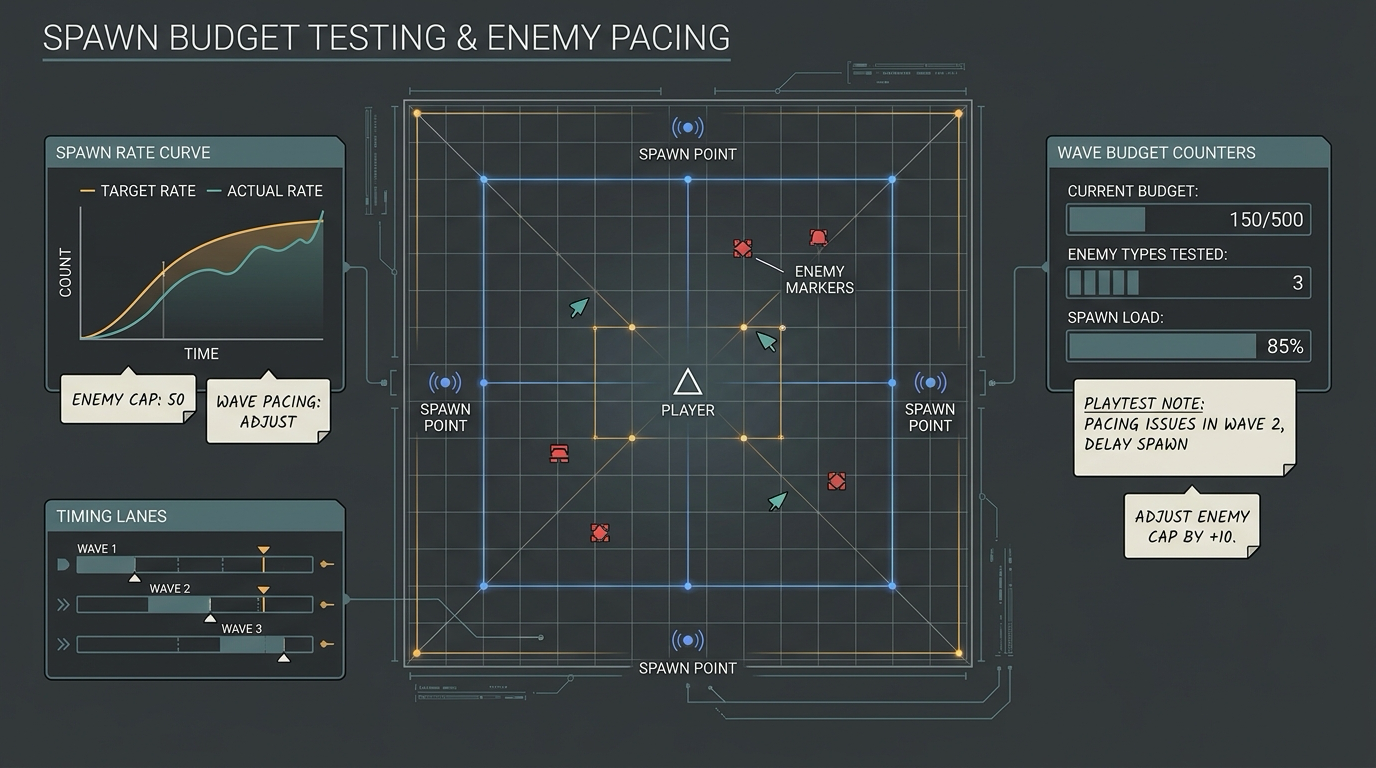
Use a boring arena on purpose. One rectangle, one obstacle, four spawn edges, one player start, one reset. Keep enemy speed, player speed, hit damage, and arena size unchanged across variants. If you change those while changing the spawn rule, you no longer have a spawn budget test.
The first version should expose numbers on screen: elapsed time, current enemy count, active cap, next spawn timer, player health, and deaths. That little debug strip is more useful than another sprite pass. It tells you whether the game feels bad because the rule is wrong or because the implementation is drifting.
Weak Prompt vs Spawn Budget Prompt
| Goal | Weak prompt | Better prompt |
|---|---|---|
| Add pressure | Make more enemies spawn | Keep the same arena and enemy. Create a variant with one enemy spawning every 2 seconds until 6 are active. Show active count and next spawn timer. |
| Test the cap | Make it harder over time | Create three variants with active enemy caps of 4, 6, and 8. Do not change enemy speed, player speed, damage, or arena layout. |
| Test fairness | Spawn enemies around the player | Spawn enemies only at edge markers at least 300 pixels from the player. Add a 0.5 second warning marker before each spawn. |
| Compare waves | Add waves | Run a 60-second test with 10-second waves. Log time survived, enemies defeated, peak active count, and cause of death. |
The Pass Fail Rule
A spawn budget passes when the player can see why pressure is rising, make a plan, recover after clearing space, and explain the death in one sentence. It fails when enemies appear without warning, the active count hides individual threats, or the best strategy is to kite in circles forever.
Do not grade by excitement alone. A messy prototype can feel exciting for one run because novelty covers the design. Run the same 60-second test five times. If every run produces a different failure with no pattern, reduce the variables. If every run ends the same way, the budget is finally telling you something.
Lower the spawn rate
Players understand the enemy but never get time to choose their next move.
Arena games, horde tests, and early survival loops where recovery matters.Lower the active cap
The screen becomes unreadable before the enemy behavior gets interesting.
Small arenas, mobile-sized views, and prototypes with collision-heavy movement.Increase spawn warning
Deaths feel cheap because threats enter too close or too suddenly.
Top-down action, dodge games, and anything with off-screen enemy entry.Add a second enemy type
The first enemy has a stable budget and the player can survive by repeating one obvious answer.
The moment after pacing is measured, not before.Engine Choice Comes After the Budget
Godot is comfortable for this test because timers, scene duplication, and simple 2D control are direct. Phaser is strong when your first playable lives in the browser and you want scene-clock timing without a heavy editor. GDevelop works when visible event logic helps the team reason about spawn rules. Unity starts to make more sense when object pooling, profiling, and production performance become part of the question.
The tool matters less than the constraint. If the AI builder or engine changes the arena, enemy speed, and spawn rule at the same time, the test is compromised. Your prompt has to protect the comparison.
- Use one enemy type until the spawn rule has a clear result.
- Keep arena size, obstacle layout, player speed, enemy speed, and damage unchanged.
- Display elapsed time, active enemy count, active cap, and next spawn timer.
- Test spawn interval, active cap, spawn distance, and wave length separately.
- Add warning markers before edge spawns.
- Run the same 60-second test at least five times before adding enemy variety.
Add enemy types after the spawn budget proves what the first enemy can carry. Until then, variety is a fog machine.
FAQ
What is an AI game prototype spawn budget test?
It is a small playable test where you keep the arena and enemy behavior fixed, then compare spawn timing, active enemy caps, spawn distance, and wave length.
When should I add a second enemy type?
Add a second enemy type when the first enemy has a stable spawn budget and players survive by repeating one answer. That means the pacing works but the decision space needs another pressure shape.
Should a first playable use object pooling?
Use pooling when the prototype repeatedly creates and removes enemies fast enough to cause stutter or garbage collection noise. Before that, focus on making the spawn rule measurable.